How to fill it in
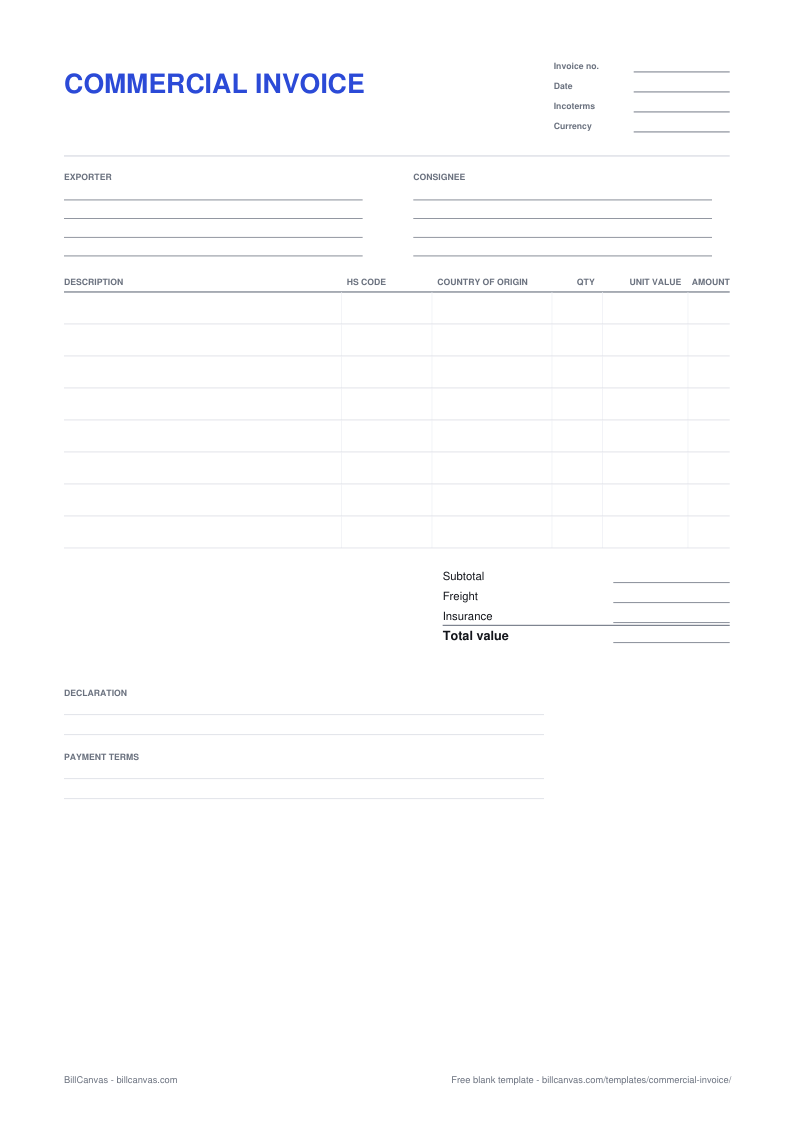
- Start with the exporter block: legal business name, address, country and the email the broker can reach.
- Add the consignee — the importer of record — with the delivery address and any VAT, EORI or importer number the destination uses.
- Print the invoice number and date, the Incoterms term and the currency. If the term is DAP, the buyer clears import; if it is DDP, you do.
- Describe each product plainly, then add the HS code and the country of origin. Your freight broker can classify the goods if you send photos and material details.
- Value each line at the transaction price. Show freight and insurance separately when the term puts them in the customs value.
- Sign the declaration, attach the packing list, and keep a copy with the export record.
The fields customs actually checks
Customs is not reading the invoice for style. It is checking that the goods are described accurately, that the value is real, and that the origin and classification produce the right duty. A vague description such as “gift” or “samples”, a missing HS code or a value that does not match the freight paperwork will hold the shipment while the broker asks questions.
PDF or Word?
The PDF is a printable form: print it and fill it in by hand, or type over it in a PDF editor. The Word file is for typing: replace the bracketed text, add or remove rows, then save as PDF for the broker. Both are free and neither uploads anything.
If what you need is a normal invoice rather than a customs document, the online invoice generator produces a finished PDF in the browser.
Common mistakes
- Understating the value to reduce duty. Customs can revalue the shipment and fine the importer.
- A description that says what the box is, not what is inside it.
- No country of origin, or an origin that does not match the goods.
- Freight folded into the unit price, so the customs value cannot be checked.
- A total that does not match the packing list or the bill of lading.
When you need one
A commercial invoice is for goods that cross a border. A domestic sale needs a normal invoice, not a customs document. If you are still confirming the order before shipment, start with a proforma invoice and convert it once the goods are ready. The commercial invoice guide covers the sequence, the Incoterms and the mistakes that delay clearance.