How the formulas work
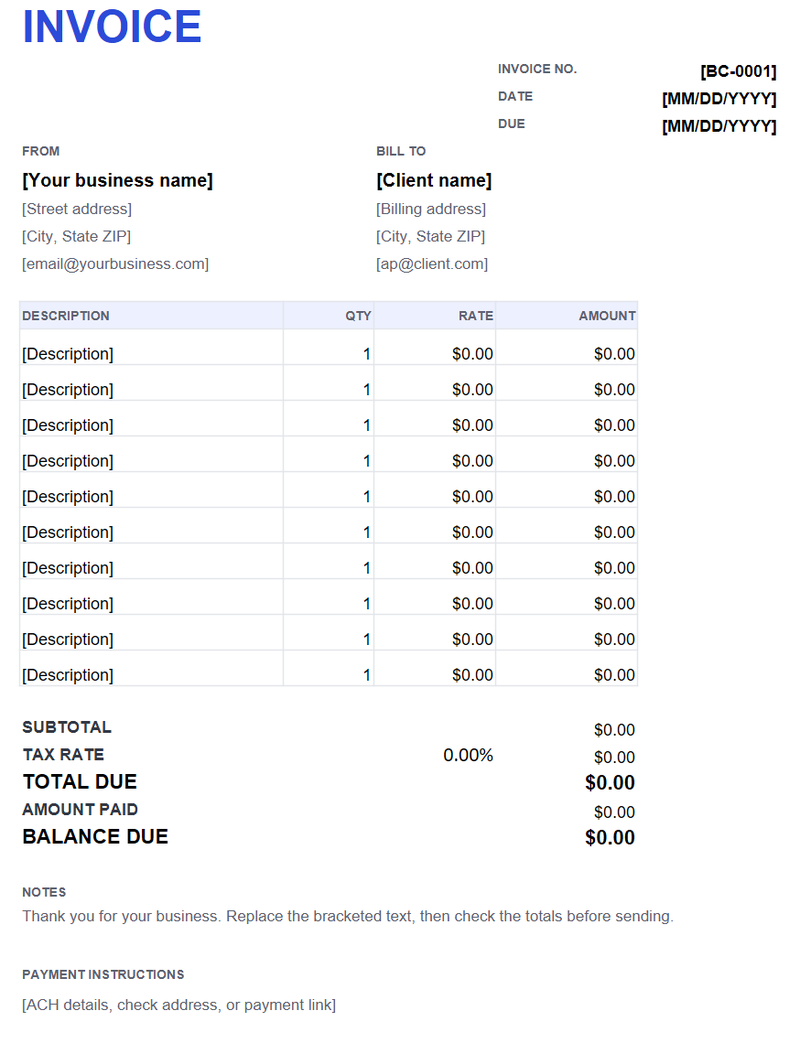
Each line amount is quantity multiplied by rate. The subtotal adds the line amounts, the tax line multiplies the subtotal by the rate you enter, and the balance subtracts any amount already paid. You only type in the white cells; the shaded totals update.
Adding rows
Insert a row above the last line item so the SUM range expands with the table. If you insert below the range, extend the subtotal formula to include the new row. Do not type over the amount and total formulas unless you intend to replace them.
Set the tax rate
Enter the rate in cell D26 as a decimal: 0.0825 for 8.25%. Leave it at 0 if you do not collect sales tax. The tax amount and total update automatically. Sales tax rules depend on your state and what you sell.
Print or save as PDF
The print area is B2:F36, US Letter, portrait, fit to one page wide. Check the preview before sending. To send a fixed copy, save as PDF rather than sharing the workbook.