BillCanvas
USUnited States

Home/Templates/Excel

Templates · Excel

Free quote template for Excel

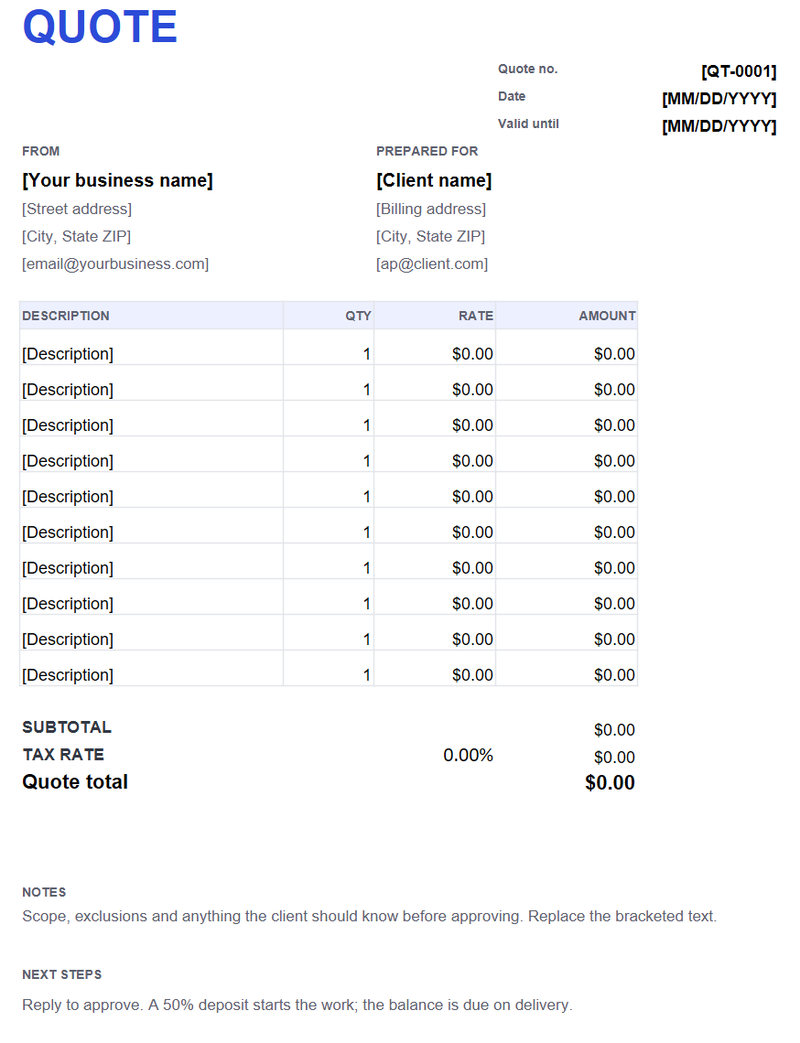
Enter the quantities and rates, set the tax rate, and Excel works out the subtotal and quote total. Add a validity date and the next step.

Quote template (.xlsx)

US Letter · formulas · validity date · next steps

Excel 2016+ / Microsoft 365 / LibreOffice / Google Sheets. No macros.

What the workbook includes

  • Quote number, date and valid-until date
  • Ten line rows with quantity, rate and amount formulas
  • Subtotal, tax rate and quote total formulas
  • Notes and next steps / deposit instructions
  • Read me sheet with the steps to edit and print
Free quote template for Excel preview
Quote template (.xlsx) · Excel · open full size

How the formulas work

Each line amount is quantity multiplied by rate. The subtotal adds the line amounts; the tax line multiplies the subtotal by the rate you enter, and the quote total adds the tax. The workbook has no macros or protected sheets.

Validity and next steps

Put the actual valid-until date in the header, not just “valid for 30 days.” In the next-steps block, say what happens after approval: a deposit, a start date, or a signature. A quote the client can act on is more likely to be approved.

Adding rows and printing

Insert a row above the last line item so the SUM range expands. The print area is US Letter, portrait, one page wide. Save as PDF before sending so the formulas and layout are fixed.

Quote vs invoice

A quote is an offer; an invoice asks for payment. Keep the quote number separate from the invoice number. The document guide walks through the sequence.

FAQ

Do the totals calculate automatically?

Yes. The line amounts, subtotal, tax and quote total are formulas; you only enter quantities, rates and the tax rate.

Does it work in Google Sheets?

Yes. Upload the .xlsx; the formulas carry over. Check the print area and widths after import.

Should I include tax on a quote?

You can show it or state that prices exclude tax and that tax will be added on the invoice if required.

How do I convert it to an invoice?

The workbook does not convert itself. Use the online quote generator for a one-click invoice, or copy the line items into the invoice template.

Related templates

All templates →