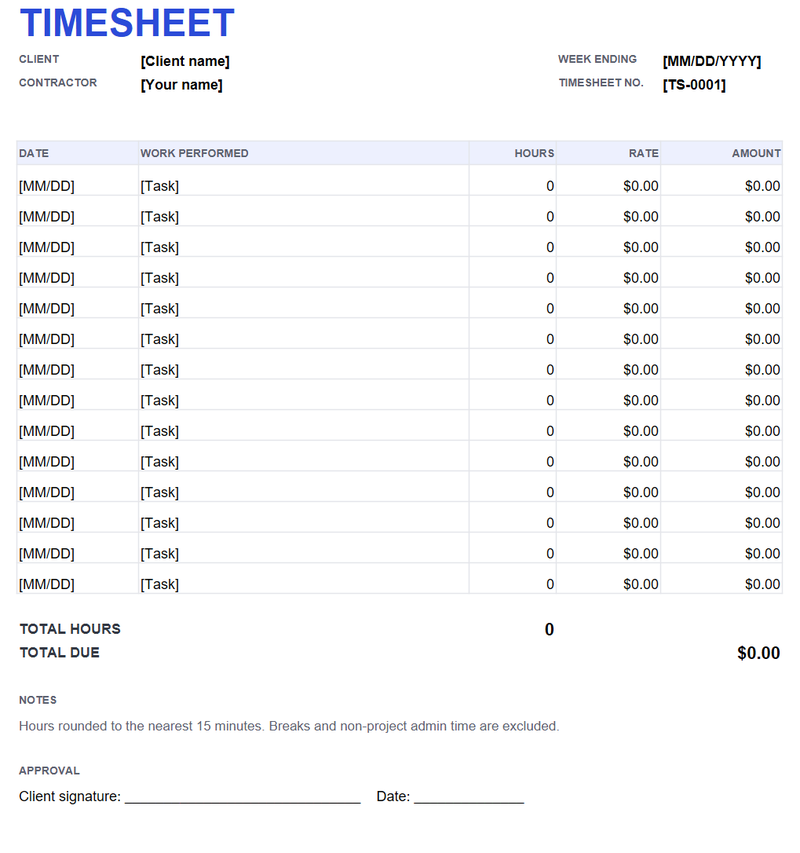
How the formulas work
Each row’s amount is hours multiplied by rate. The total hours cell adds the hours column, and the total due cell adds the amounts. Enter 0.25 for 15 minutes and 0.5 for 30 minutes; do not enter “1h 15m” in a numeric cell.
What to write in each row
One row per task or per day. “Homepage build, 3 hours” is checkable; “website work, 24 hours” is not. If you round hours, say the rule on the timesheet and apply it to each entry, not just the weekly total.
Adding rows and printing
Insert a row above the last line so the SUM ranges expand. The print area is set to US Letter, portrait, one page wide. The approval line is at the bottom; print or save as PDF and ask the client to sign.
Timesheet vs invoice
A timesheet records time; an invoice asks for money. Keep both. The timesheet generator can turn the same rows into an invoice and reference the timesheet number.