BillCanvas
USUnited States

Home/Templates/Word

Templates · Word

Free expense report template for Word

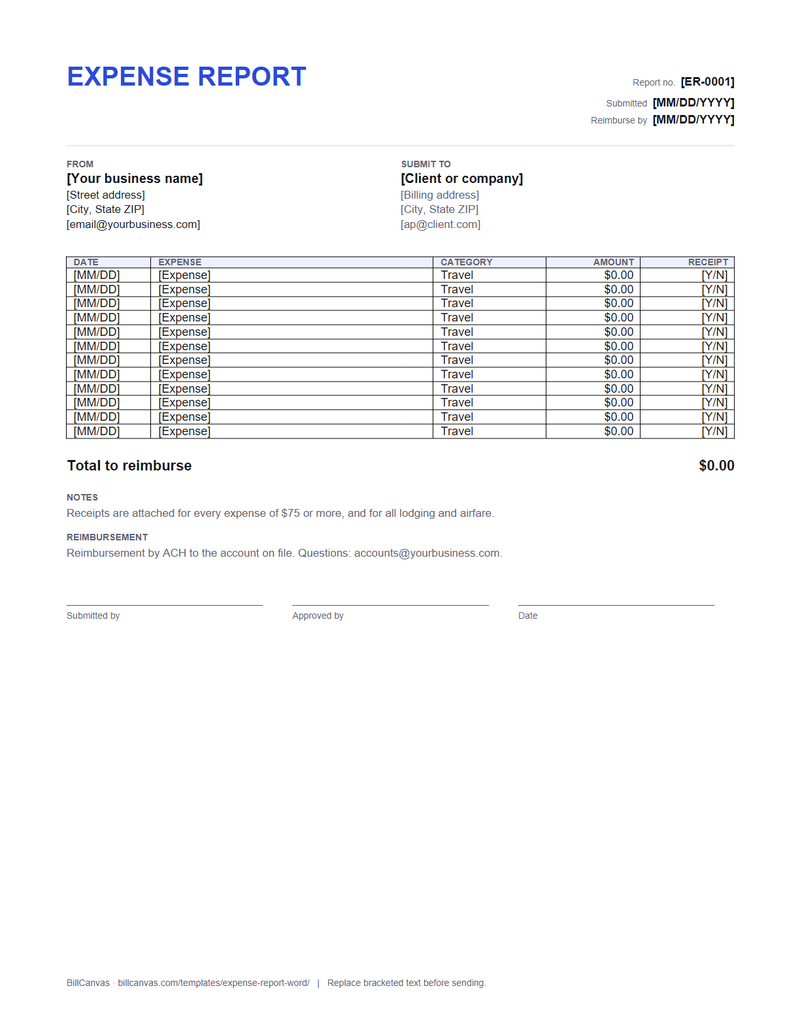
A printable expense report with date, expense, category, amount and receipt columns, plus a reimbursement total and approval lines.

Expense report (.docx)

US Letter · editable · 12 rows · approval lines

Word 2016+ / Microsoft 365 / LibreOffice / Google Docs. Totals are typed.

What is in the document

  • Report number, submitted date and reimburse-by date
  • Your details and who the report is submitted to
  • Twelve rows of date, expense, category, amount and receipt
  • A total-to-reimburse line
  • Notes, reimbursement instructions and approval signatures
Free expense report template for Word preview
Expense report (.docx) · Word · open full size

How to use it

  1. Download the .docx and replace the bracketed text.
  2. One row per expense. Use the category column consistently so the report is easy to approve.
  3. Mark the receipt column Y or N; attach the receipts for anything over $75 and for all lodging.
  4. Add the amounts and type the total to reimburse.
  5. Print or save as PDF, get the approval signature and attach the receipts.

Categories

Travel, Meals, Materials, Software and Other is enough for most freelance work. If the client uses cost codes, use their categories. The point is to let someone approve the report quickly, not to invent labels.

The report vs the invoice

If the client reimburses you directly, this report with receipts is the cleaner document. If the cost is part of what you are billing, put it on the invoice as its own line and attach the receipts. Do not do both for the same cost. The expense report guide has the detail.

Word vs Excel

Use Word for a printed report with signatures. Use the Excel expense report if you want category subtotals to calculate automatically.

FAQ

Is the Word expense report free?

Yes. The DOCX is free, with no account, email gate or watermark.

Does it calculate subtotals?

No. Word does not run formulas. The Excel version has category SUMIF subtotals and a total.

Do I need a receipt for every expense?

Follow the client or company policy. A common rule is receipts over $75, plus all lodging and airfare.

Can I use it in Google Docs?

Yes. Upload the .docx and edit it in Google Docs; check the table before sending.

Related templates

All templates →