BillCanvas
USUnited States

Home/Templates/Word

Templates · Word

Free timesheet template for Word

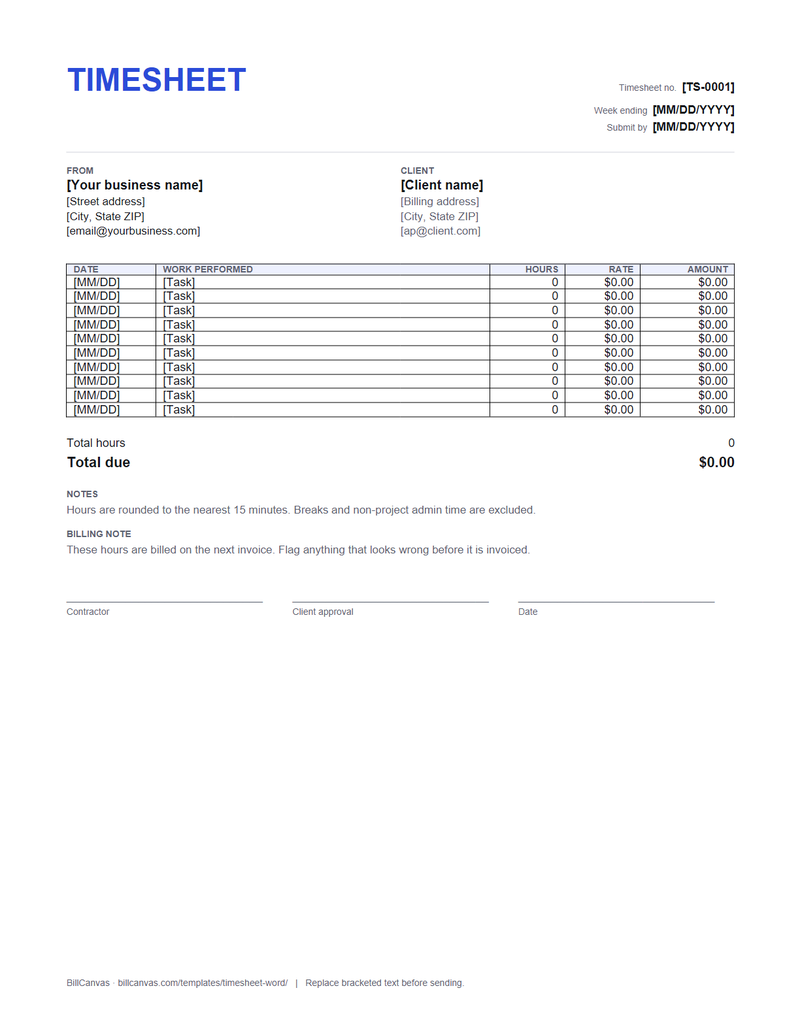
A weekly timesheet in US Letter with date, task, hours, rate and amount columns, plus a client sign-off line.

Timesheet template (.docx)

US Letter · editable · 10 rows · sign-off line

Word 2016+ / Microsoft 365 / LibreOffice / Google Docs. Totals are typed, not formula-driven.

What is in the document

  • Timesheet number, week ending and submit-by date
  • Your details and the client
  • Ten rows of date, work performed, hours, rate and amount
  • Total hours and total due lines
  • Notes and a billing note
  • Contractor and client approval signatures
Free timesheet template for Word preview
Timesheet template (.docx) · Word · open full size

How to use it

  1. Download the .docx and replace the bracketed text.
  2. One row per task or per day. “Homepage build, 3 hours” is checkable; “website work” is not.
  3. Enter hours as decimals: 0.25 for 15 minutes, 0.5 for 30 minutes. State the rounding rule in the notes.
  4. Calculate each amount, the total hours and the total due, and type them in.
  5. Print or save as PDF and ask the client to sign the approval line before you invoice.

Why get a client signature?

There is no federal rule that an independent contractor must keep a timesheet, but the signature is evidence. If a client later says the hours were never approved, a sheet with dates, tasks, hours and their own sign-off answers the question.

Word vs Excel

Word is better when you want to print and sign a sheet. If you want the hours and amounts to total automatically, use the Excel timesheet template or the online timesheet generator.

Round once

Round each entry, not the weekly total, so the arithmetic stays visible. Put the rule on the sheet and apply it consistently. Do not bill breaks you were not working through or travel time the contract does not allow.

FAQ

Is the Word timesheet free?

Yes. The DOCX is free for your own business, with no account, email gate or watermark.

Does it calculate the totals?

No. Word does not run formulas. Use the Excel timesheet or the online generator if you want automatic totals.

Can I use it in Google Docs?

Yes. Upload the .docx to Google Docs and edit it there; check the table widths before sending.

Does the client need to sign it?

It is not legally required, but a signature is useful evidence that the hours were approved before invoicing.

Related templates

All templates →